
Admin dashboard
Learn how to use the RenewMap admin dashboard to manage your organisation's users, licences, and API keys.
The admin dashboard lets you manage your organisation’s RenewMap account. You can view your licence allocation, manage users, and generate API keys. The admin dashboard is only accessible to users with an admin role.
Before you begin
- You must have an admin role to access the admin dashboard.
- You are an admin if you can see the link to the admin dashboard as outlined in the image below.
- Contact your RenewMap account manager or [email protected] if you need admin access.
Access
If you are an admin you can access the admin dashboard via the three dots dropdown menu located in the top right of the navigation:
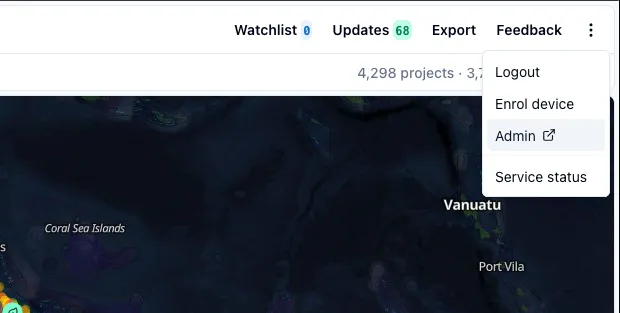
Clicking on Admin will take you to a new page with the admin dashboard.
Licence overview
The top of the admin dashboard shows a summary of your organisation’s licence usage.
- Licences — the total number of licences your organisation has purchased.
- Total — the total number of licences your organisation currently has in use.
- Activated — users who have accepted their invitation and signed up.
- Pending — users who have been invited but have not yet signed up.
Users table
The users table gives you an at a glance view of everyone in your organisation. For each user you can see their email address, role, account status and when they were last active.
Managing users
Add a user
To invite a new user to your organisation:
- Select Add user.
- Enter the user’s email address.
- Select Add user to send the invitation.
The user will receive an email invitation to join your organisation. They will appear as Pending in the users table until they sign up.
Remove a user
To remove a user from your organisation:
- Find the user in the users table.
- Click the three dot menu.
- Select Remove user next to the user you wish to remove.
- Confirm the removal.
Removing a user immediately revokes their access to RenewMap. Their licence becomes available for a new user.
Download users list
To download a CSV of all users in your organisation, select the download icon next to the Add user button. The CSV includes each user’s email address, role, account status and last active date.
API keys
You can generate and regenerate your organisation’s API key from the Settings tab in the admin dashboard. Use the API key to access RenewMap data programmatically.