
What are projects?
Track renewable energy projects across Australia and New Zealand with RenewMap. Start accessing real-time data on solar, wind, hydro, and battery storage.
RenewMap tracks renewable energy projects as they are being developed across Australia and New Zealand. The dots on the map indicate individual projects. Hovering over a dot shows a preview of the project, including its name, status, size and technology type. Additional information may be shown depending on what visualisations you’ve selected.
In RenewMap, a project is a renewable energy generation or storage facility tracked through its complete lifecycle with comprehensive technical, regulatory, commercial, and financial data. Each project represents a single installation or development asset with associated details about their location, infrastructure, development approval (DA), EPBC status, timeline, network, commercial associations, regulatory status, and financial events.
Projects include both generation facilities (solar, wind, hydro, etc.) and storage systems (battery, pumped hydro, hydrogen), tracked from early-stage development through construction, operation, and decommissioning.
Viewing project details allows you to:
- Identify opportunities - assess projects by size, stage, technology, and location to find relevant prospects. Read about how RenewMap can help you grow your project pipeline.
- Track development progress - monitor projects through lifecycle stages to time engagement appropriately. Read about how RenewMap can help you win supply contracts.
- Analyze the market - view comprehensive project data for technical analysis, site assessment, and strategic planning.
- Make informed decisions - access up-to-date regulatory, network, and commercial information about a particular project. Read about how RenewMap helps you level up your decision making.
How to view project details
To view a project’s details:
- While browsing the map, select a project’s dot or boundary.
- While viewing the table, select a project’s entry in the table. If you view the table in fullscreen, collapse the table first.
- While searching for projects, select the project’s name from the search results.
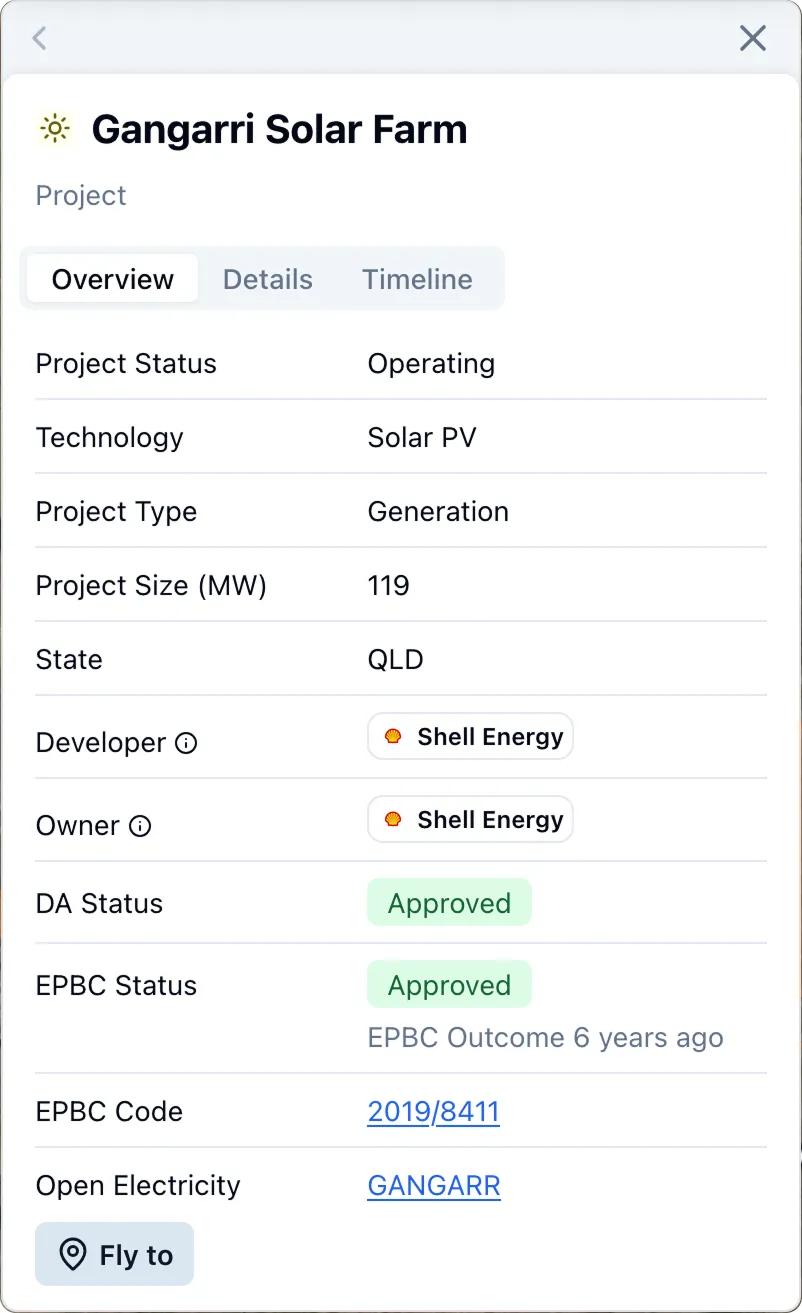
The project details panel displays:
- An Overview with high-level information about the project’s status, type, size, and developer and regulatory status.
- Details about the project’s infrastructure, network, regulatory status, associated contractors, EPBC status, power purchase agreements, renewable energy zone, location and more.
- A Timeline showing key dates in the project’s history including milestones around EPBC events, DA approvals, financial investment decisions and major project status changes.
How to hide project details
To hide project details, select the close button in the detail panel’s top bar.